Flute Webhooks CLI is a monitoring and debugging developer tool for Flute webhooks.
It is a command-line and TUI (terminal user interface) application that can display call statuses, inspect delivery logs, manage endpoints, and forward live webhook payloads. The tool can initiate and test webhook calls, including creating new webhooks and using existing ones. It supports all Flute webhook endpoints.
When an API call fails, Flute Webhooks CLI shows a sticky error modal. This is a display that stays on screen until dismissed. It shows the server's title, details, exceptionType, and a correlationID.
Download and install the application for your platform.
The latest installer can always be found at: https://github.com/getflute/flute-webhooks-cli/releases/latest.
macOS / Linux (cURL)
Use the following command to install the application for macOS or Linux using cURL.
curl -LsSf https://github.com/getflute/flute-webhooks-cli/releases/latest/download/flute-webhooks-cli-installer.sh | shmacOS / Linux (Homebrew)
Use the following command to install the application for macOS or Linux using Homebrew.
brew install getflute/flute-webhooks-cli/flute-webhooks-cliWindows (x64, PowerShell)
Use the following command from any location with either a Windows command window or a PowerShell window. This does not require elevated permissions.
powershell -ExecutionPolicy Bypass -c "irm https://github.com/getflute/flute-webhooks-cli/releases/download/v0.7.4/flute-webhooks-cli-installer.ps1 | iex"After installing the application, close the command window. Re-open a command window.
To verify that the installation was successful, run:
flute-webhooks --version
A version number should display.
To get a list of help commands, run:
flute-webhooks --help
When launched, the application automatically checks for a newer version. If a newer version exists, a non-blocking notice displays.
To explicitly update the application, run:
flute-webhooks update
For configuration options and saving them, see Configuring Flute Webhooks CLI.
Before using this application, you must be authenticated. Use your merchant or partner API key credentials.
To be authenticated as a user, use:
flute-webhooks auth login
You will be prompted for your client_id and client_secret. The secret prompt is hidden.
The credentials are stored in your OS keychain and never written to disk in plain text. You are not required to authenticate each time you start this application. If your credentials later change, run this command again with the new credentials.
By default, credentials are stored for the sandbox profile. This is the same as using:
flute-webhooks --profile sandbox auth login
To set up for production, use:
flute-webhooks --profile production auth login
To display the current authentication key (used for the bearer token), run:
flute-webhooks auth keys
Flute CLI runs in two modes: TUI (terminal user interface) mode and command line mode.
The TUI (terminal user interface) is a keyboard-driven, interactive, full-screen mode.
It runs inside the terminal but behaves more like a lightweight application. This includes menus, lists, and keyboard navigation you interact with in real time. You launch it and stay inside it to browse and view data, such as webhook endpoints, delivery logs, and event types.
To start the TUI, in a command window opened to any location, run:
flute-webhooks tui
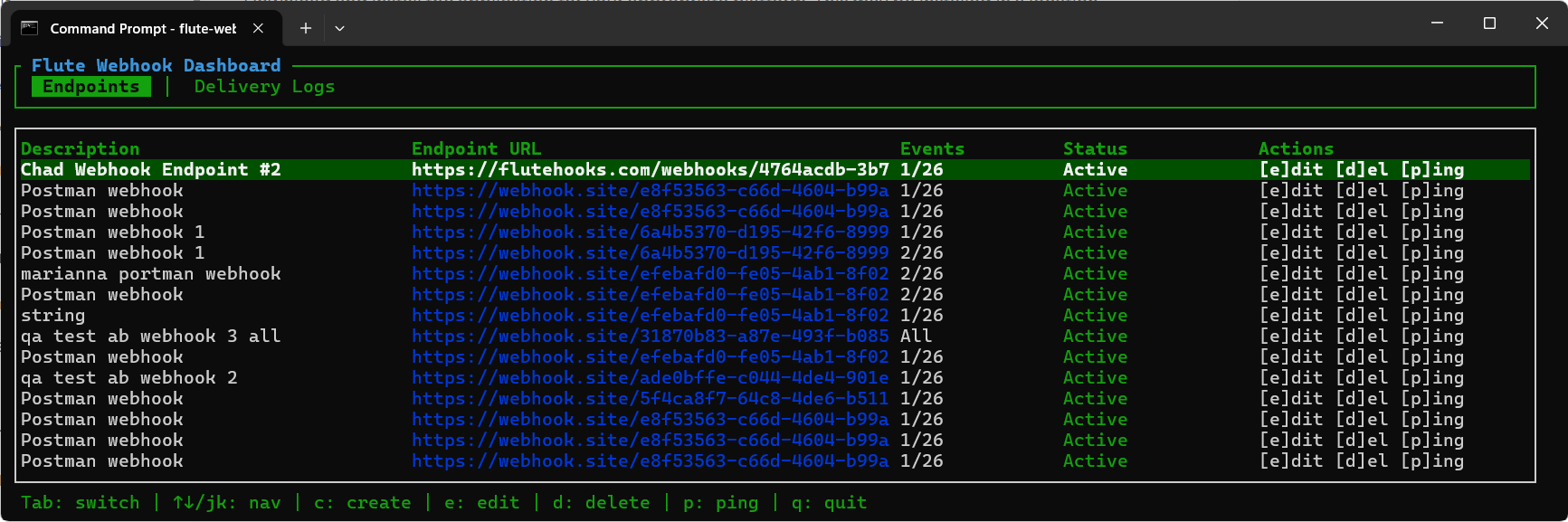
Use arrow keys to navigate rows, expand items, and toggle checkboxes. The following commands and keystrokes may be used to navigate Flute Webhooks CLI.
| Context | Controls |
|---|---|
| Top level | Tab switch tabsq quitCtrl-C quit anywhere |
| Endpoints tab | ↑↓ / jk navigatec createe / Enter editd deletep ping |
| Delivery Logs tab | ↑↓ / jk navigatePgUp / PgDn / Home / End jumpv / Enter view detailst trigger forwardr retry (failed only)l listener config1 cycle endpoint filter2 cycle event-type filter3 cycle status filter (All → Success → Failed)s toggle sortx clear filters |
| Form modal (create/edit) | Tab / ↑↓ move between fields←→ swap Cancel/SubmitSpace / Enter toggle controlsPgUp / PgDn scroll event listEsc cancel |
| Listener modal | Tab / ↑↓ move between fieldstype the URL Space toggle EnabledEnter activateEsc cancel |
| Delete confirm | y / Enter deleten / Esc cancel |
| Details modal | ↑↓ / jk scrollPgUp / PgDn pageEsc / Enter / q close |
| Error modal | Enter / Esc dismiss (every other key is absorbed while it's up) |
| Update-available modal | Enter / Esc dismiss (every other key is absorbed while it's up) |
While typing in a text field, such as a URL or a name, single-character keys such as q, c, d, e, p, r, l, and t are treated as literal characters and do not trigger TUI commands.
The command line mode is a non-interactive mode.
Each invocation is a single command with arguments and flags that runs once, displays output, and exits. It's built for scripting, automation, and one-off lookups. Output can be piped into other tools, chained in CI, or run unattended. The command line mode issues instructions through the terminal and is scriptable.
For example:
flute-webhooks webhooks endpoints list
flute-webhooks --output json webhooks deliveries list --limit 15 | jq
In this example, the application jq must have been previously installed.
Endpoints The following is a list of endpoint commands the Flute Webhooks CLI can run.
flute-webhooks webhooks endpoints list
flute-webhooks webhooks endpoints get <id>
flute-webhooks webhooks endpoints create --url https://… --events transaction.card.refunded [--name "My Hook"]
flute-webhooks webhooks endpoints update <id> [--url …] [--events …] [--name …] [--status active|inactive]
flute-webhooks webhooks endpoints delete <id> --yes
flute-webhooks webhooks endpoints ping <id>
Event types
flute-webhooks webhooks event-types listDelivery logs
flute-webhooks webhooks deliveries list [--endpoint-id <id>] [--status success|failed] [--limit 50]  # server caps page size at 100
flute-webhooks webhooks deliveries get <id>
flute-webhooks webhooks deliveries retry <id>
Headless listener
This forwards every new successful delivery's headers and body to a local URL. Runs in the foreground until Ctrl-C.
flute-webhooks listen --forward-to http://127.0.0.1:3000/webhookGlobal flags (accepted on every subcommand)
--profile <sandbox|production>
--debug
--output table|json
--output json works on every CLI subcommand, producing pretty-printed JSON for piping into jq. To save output to a file instead of piping it, redirect stdout, for example:
flute-webhooks --output json webhooks deliveries list --limit 50 >> output.jsonEvery non-TUI subcommand also supports a structured JSON error envelope ({kind, message, status?, correlation_id?}) printed to stdout on failure, which makes Flute Webhooks CLI easier to drive from scripts and agents. See AGENTS.md in the flute-webhooks-cli repository for the full machine-readable contract.
Every documented Webhook API call is reachable from both TUI and CLI:
| Action | TUI | CLI |
|---|---|---|
| List endpoints | Endpoints tab | webhooks endpoints list |
| Get one endpoint | Implicit (table shows all fields) | webhooks endpoints get <id> |
| Create endpoint | c → form modal | webhooks endpoints create |
| Update endpoint | e / Enter → form modal | webhooks endpoints update <id> |
| Delete endpoint | d → confirm modal | webhooks endpoints delete <id> --yes |
| Ping endpoint | p (toast on result) | webhooks endpoints ping <id> |
| List event types | Used to populate the form | webhooks event-types list |
| List delivery logs | Delivery Logs tab | webhooks deliveries list |
| Get delivery log detail | v / Enter → details modal | webhooks deliveries get <id> |
| Retry failed delivery | r on a failed row | webhooks deliveries retry <id> |
| Listen and forward locally | l → listener modal | flute-webhooks listen --forward-to <url> |
| Manual one-shot forward | t on a successful row | (listen covers it; manual one-shot deferred) |
| Self-update | Modal on startup; dismissable | flute-webhooks update |
Pass --debug to log every HTTP request and response (status, URL, body):
flute-webhooks --debug auth keys    # traces print to stdout
flute-webhooks --debug tui          # traces go to ~/.flute/flute-webhooks.log
For non-TUI commands, traces print to stdout so you can pipe them through jq or grep. For the TUI, stdout is owned by the terminal renderer, so traces are appended to ~/.flute/flute-webhooks-cli.log. Open a second terminal and run tail -f ~/.flute/flute-webhooks-cli.log to watch live.
Response bodies are logged in full with no truncation, so the server stack traces are captured intact. The bearer token is never logged.
Without --debug, default tracing is INFO/WARN. Non-TUI commands write to stderr; the TUI writes to the log file.
| Issue | Resolution |
|---|---|
| No credentials for the sandbox | Run: flute-webhooks auth login |
| Terminal looks broken after a crash | The panic hook should restore it automatically. If it did not, run: reset or stty sane |
| Busy: "try again in a moment" | The action queue is briefly saturated by an in-flight API call. The next keypress will go through. |
| Polling cadence seems slow after an error | This is exponential backoff. On consecutive 401, 403, 404, or 5xx failures, the poll interval doubles each time, capped at 30 seconds (or your configured base interval, if it's larger — backoff never polls faster than your normal cadence). The counter resets on the first successful poll. |
| Token refresh | Bearer tokens are cached in memory and proactively refreshed 60 seconds before expiration. If the server returns a 401 anyway, the client invalidates the cache, fetches a fresh token, and retries the original request once. Only requests that fail twice in a row are surfaced as errors. |
| Unknown profile: uat | The uat profile was renamed to sandbox in v0.5.0.Run flute-webhooks auth login to register credentials under the new name. Your old uat keychain entry stays orphaned until manually removed. Update any FLUTE_PROFILE=uat environment variables or default_profile = "uat" config entries to sandbox. |
| Errors flash by too fast | Errors display a red modal that stays on screen until you press Enter or Esc.While it's up, the modal absorbs every other key, so q won't quit, c won't open the create form, and so on. |
macOS Keychain prompts every time I run cargo run | Every cargo build produces a new unsigned binary, and macOS Keychain ACLs are tied to the binary's code signature, so "Always Allow" doesn't survive a rebuild.For development, install once with cargo install --path . and click "Always Allow" on that stable binary. Re-running it won't re-prompt until you cargo install again. |
POST requests require a Content-Length | Fixed. Bodyless POST/PUT/PATCH requests now always send Content-Length: 0, which the Flute gateway requires on every write-method request. |
An optional configuration file may be manually created at: ~/.flute/config.toml. The following are the valid key entry values.
| Setting | Default | Description |
|---|---|---|
| default_profile | sandbox | Specifies the default environment profile. Valid values: sandbox or production. |
| auto_update_check | true | Specifies checking for updates on each launch, at most once every 24 hours. |
| poll_interval_seconds | 5 | Specifies the polling interval (in seconds). Valid range: 5 to 60. Out-of-range values fall back to 5 with a warning. |
This text may be pasted into that file. These represent the defaults. They may be changed to fit your needs.
default_profile = "sandbox"
poll_interval_seconds = 5
auto_update_check = trueIn addition to the configuration file, Flute Webhooks CLI recognizes a small set of environment variables. These are useful for CI pipelines, scripting, and temporarily overriding a setting without editing config.toml.
Where a setting can be controlled more than one way, the command-line flag (such as --profile or --debug) takes precedence over its corresponding environment variable, which in turn takes precedence over the value in config.toml.
| Variable | Description |
|---|---|
| FLUTE_PROFILE | Specifies the default profile. Overridden by the --profile flag if both are set. |
| FLUTE_CLIENT_ID | Supplies the OAuth client ID directly, skipping the OS keychain lookup. Intended for CI. |
| FLUTE_CLIENT_SECRET | Supplies the OAuth client secret directly, skipping the OS keychain lookup. Must be set together with FLUTE_CLIENT_ID. Intended for CI. |
| RUST_LOG | Specifies the tracing filter, for example RUST_LOG=flute_webhooks_cli=debug. Overrides the --debug flag's default behavior if set. |
| FLUTE_NO_UPDATE_CHECK | Set to any value to suppress the startup update check entirely. |
| FLUTE_GITHUB_TOKEN | Optional GitHub token used for update checks. Raises the unauthenticated rate limit and is required if the release repository is private. |
| CI | When set (for example, by GitHub Actions or Buildkite), the startup update check is automatically skipped. |
Unlike config.toml, environment variables are not written to disk or stored anywhere by Flute Webhooks CLI. They must be set in your shell or system environment each time you want them to apply — for example, exported in your shell profile (.bashrc, .zshrc) on macOS/Linux, or defined as a system or user environment variable on Windows. They take effect only for the process (or session) where they're set, and are not persisted by the application the way ~/.flute/config.toml is.
The following are the profile values associated with each environment.
To select a profile (global flag, accepted before or after the subcommand), use: flute-webhooks --profile sandbox|production For example, flute-webhooks --profile sandbox sets the environment to sandbox.
The active profile is shown in the dashboard title.
| Profile | API Base URL | OAuth URL |
|---|---|---|
| sandbox (default) | https://sandbox.api.flute.com | https://sandbox.oauth.api.flute.com/oauth2/token |
production (alias prod) | https://api.flute.com | https://oauth.api.flute.com/oauth2/token |
MIT.